The editor
What this is. A PyQt6 window for writing one of these YAML configs while
watching what it does, frame by frame. It is the same engine — the same stage
classes, the same frame_for, the same numbers — driven one frame at a time
instead of over a batch.
uv sync --extra gui
uv run segmentator-gui examples/motion.yaml
uv run segmentator-gui                       # opens the launcher
Starting from nothing
Name a config and the editor opens straight onto it. Name none — which is what a double-clicked bundle does — and you get the launcher instead.
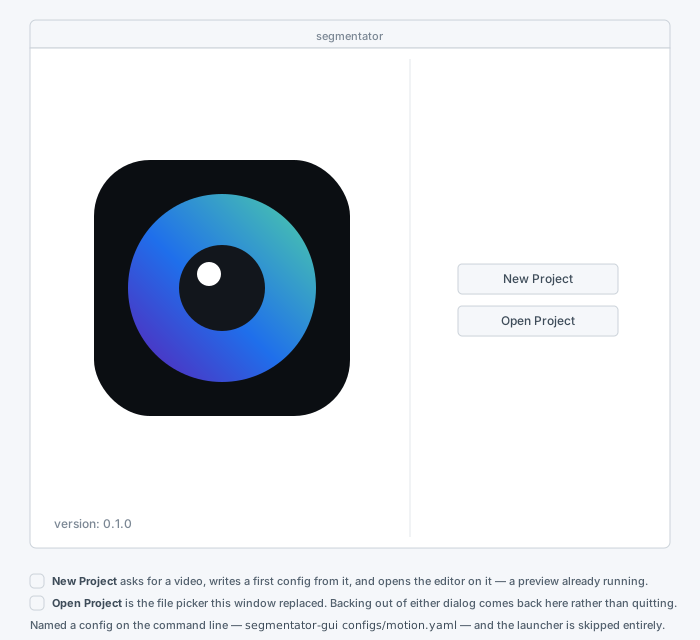
Open Project is the file picker, kept. New Project is the path that did
not exist before: a config is the unit of work here, and until now the only way
to a first one was to write the YAML by hand. So it asks for the one thing a
config cannot be written without — a video — and derives the rest, into
configs/ if you are running from a checkout and beside the video otherwise. A
frozen bundle starts with its working directory at /, where a relative
configs/ would land somewhere unwritable and unfindable.
What it writes is a display sink over that video, no stages yet: the
smallest config that is a valid one, so the editor comes up previewing rather
than showing an error box you have to clear before you can start. Nothing is
ever overwritten — a name already taken gets a -2.
The editor window
The config is a linear list of stages, so the list is the graph, drawn at 1:1
rather than as a straight line of boxes on a canvas. Where a config does branch
it branches by name — a select stage, or a sink reading a tap — and the
editor shows that as a named reference rather than as a second edge. The
reasoning behind that choice, and what a node canvas would have cost instead, is
in Why a list and not a canvas.
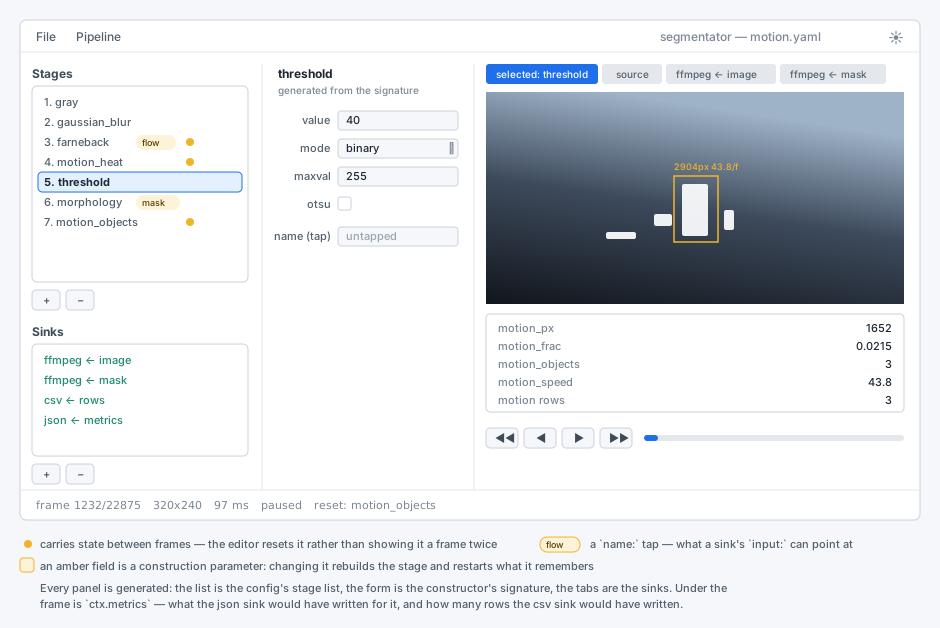
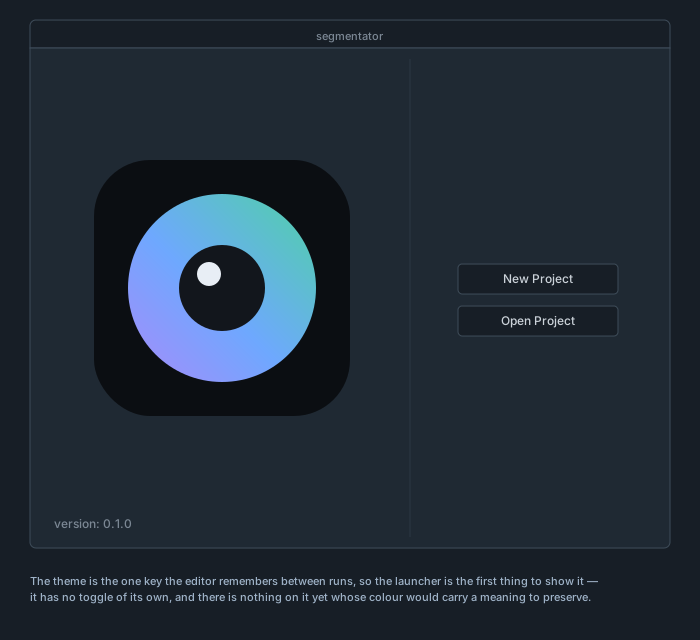
That is not a sketch of the intended design — it is what the window renders. The
editor forces one of its own two palettes and the Fusion style rather than
inheriting the desktop theme. The amber marks are the reason it is worth pinning
down: a name: tap and a stage that carries state between frames are the two
things you scan the list for while tuning, and a theme that recolours them is a
theme that hides them.
Day and night
The ☀ in the corner of the menu bar switches; the glyph is the theme you are
in, so ☾ means night. The choice is remembered between sessions.
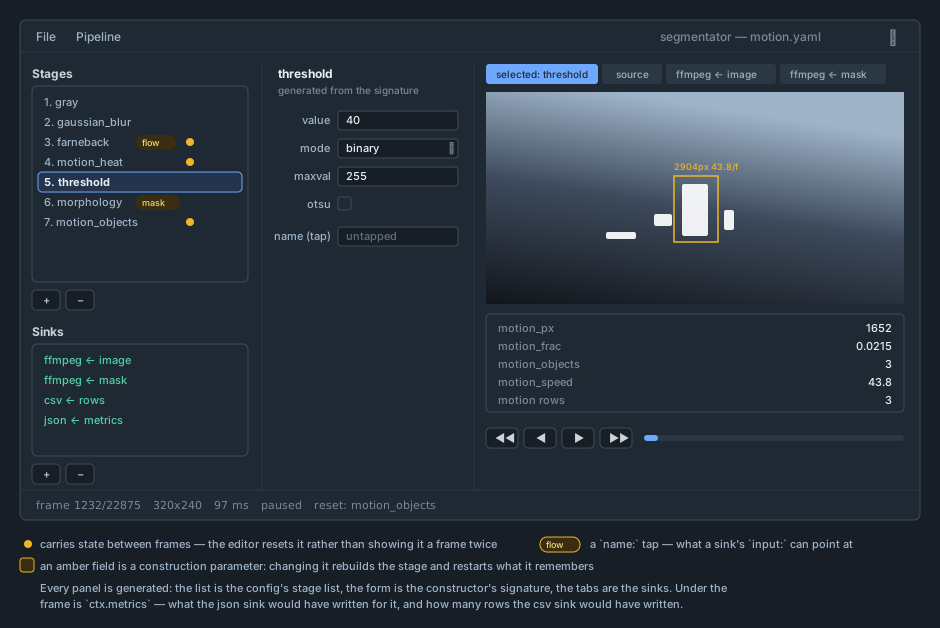
Same layout, same meanings. Two roles do not simply invert, because a palette
that flips every channel mechanically loses the things the light one was chosen
for: the blue lightens, since #1f6feb on a dark panel reads as a hole rather
than a highlight, and the amber pill becomes a dark tint behind the same amber
border — a tap has to stay recognisably a tap. The video in the preview is never
themed. It is the footage, not the furniture.
The three panels
Left — the pipeline. The stages in the order they run, then the sinks. An
amber dot marks a stage that remembers something between frames; a pill marks a
name: tap. Both matter while tuning, which is why they are on the list rather
than buried in the form.
Middle — the parameters. Generated from inspect.signature of the
registered class. There is no per-stage form to maintain: adding a stage to
segmentator/stages/ adds its form here, with the right widget per type and the
constructor's defaults already in place.
Right — the preview. One tab per thing worth looking at: the selected stage,
the untouched source, and every image sink. Under it, ctx.metrics and the row
counts — what the json and csv sinks would have written for this frame.
Opening and saving
File ▸ Open reads a config, Ctrl+S writes it back, Ctrl+Shift+S writes it
somewhere else. The document is read and written by ruamel's round-trip parser,
not by yaml.safe_load, and the difference is the point: configs/*.yaml are
heavily commented on purpose, and a save has to give those comments back.
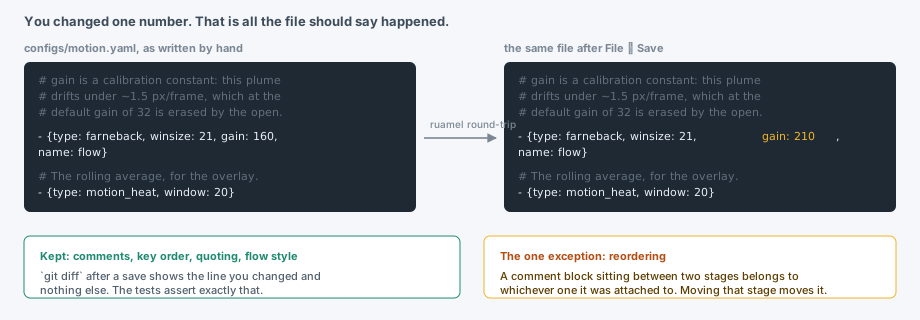
A git diff after a save shows the lines you changed and nothing else — key
order, quoting, flow style and blank lines all survive. The one thing that does
not is a comment block between two stages when you reorder one of them: it
belongs to whichever stage ruamel attached it to, and moves when that stage
moves.
Adding, removing and reordering stages
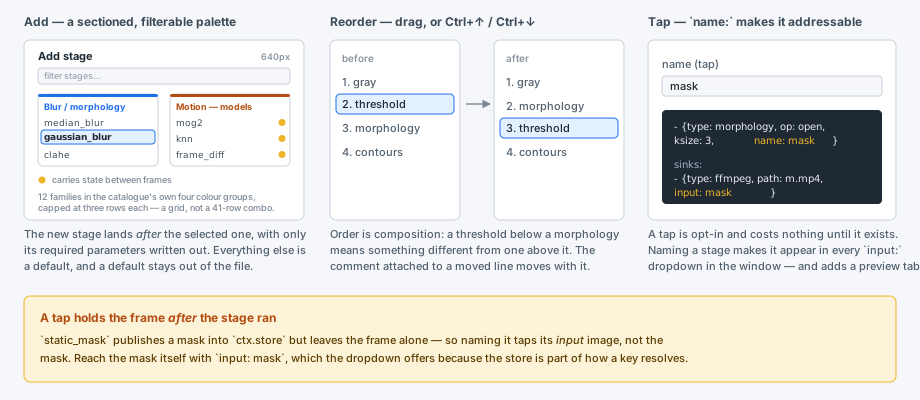
+ opens the palette — half the main window's width, and laid out as a grid of
family cards (the same twelve docs/stages.md groups into: Adjust, Blur /
morphology, Motion — models, and so on) rather than one long combo. Every name
in it is registered("stage") or registered("sink") — 43 stages, 3 sources, 6
sinks, listed because they registered themselves, not because anyone typed them
here. Each card wears its family's colour from the
catalogue — blue to prepare a frame, purple to find features in it,
green to mask it, orange to measure what moved — and lists its stages in the
same monospace the catalogue sets them in, since they are type: values to be
typed into a config rather than prose. A stage that carries state between frames
shows the same amber dot the main list marks it with, explained by a legend
under the cards; a card with more than three stages scrolls rather than growing,
so every card is the same size whatever is filed under it. A filter box above
them narrows every card at once, since a grid is still a lot to scan by eye for
one specific name. Clicking
a row selects it — across cards, only one row is ever selected — and a
double-click accepts immediately. The new stage is inserted after the selected
one and written out with only its required parameters; everything else is a
default, and a default stays out of the file.
Reorder by dragging inside the list, or with Ctrl+↑ / Ctrl+↓. Order is
composition: canny then harris(draw_on: image) puts the corners on the edge
map, and the same two the other way round does not.
− (or Ctrl+D) removes whichever list has the focus.
Optimising a chain
A chain tuned by hand is a ratchet. A stage goes in to fix what is on screen, a slider moves, another stage goes on top, and nothing is ever taken back out — what was load-bearing three edits ago may contribute nothing now. Pipeline → Optimize… looks for exactly that, and offers to remove it.
It samples sixteen frames spread across the source, runs the chain over them,
and then re-runs it with one change at a time, keeping only the changes that
leave every sink output identical — not the preview, the sinks. That
distinction matters: a csv sink watches ctx.rows and a json sink watches
the whole of ctx.metrics, so with either one present a stage contributing
nothing but edge_px is still output and will not be touched. With no sink at
all, the final image is what is compared.
Findings come in two strengths, and the dialog says which:
- provable — the argument does not depend on the frames. A
gaussian_blurwithksize: 1; a stage whose output nothing downstream reads, which is what anapply_maskpointed atsourcequietly does to everything above it; a run of per-pixel stages (brightness_contrast,gamma, non-Otsuthreshold) collapsed into onelut, checked against all 256 input values rather than sampled. - sampled — no counterexample was found in sixteen frames. That is falsification, not proof, and the sample size is not a formality: on the chain this was built against, one stage looked redundant at four frames and was demonstrably load-bearing at eight.
So nothing is applied on its own. Pure deletions start ticked; a fusion does not, because trading two named stages for a 256-entry table is a straighter chain to run and a muddier one to read. Untick anything you do not want and press OK.
One more check happens then, and it is not redundant: findings that each hold
alone need not hold together. Given gray, gray, threshold, either grey
can go — the first because the second still converts, the second because the
first already did — and taking both leaves the threshold looking at a colour
frame. Ticking a combination that does not survive gets you an amber line and
the dialog stays open.
A chain holding state — anything with the amber dot — is sampled from one contiguous run of frames instead of scattered ones, because a background model handed six unrelated frames has not seen the history its output depends on.
The search only looks one move ahead. A stage that becomes removable because another one went is found by running Optimize again.
Editing a parameter
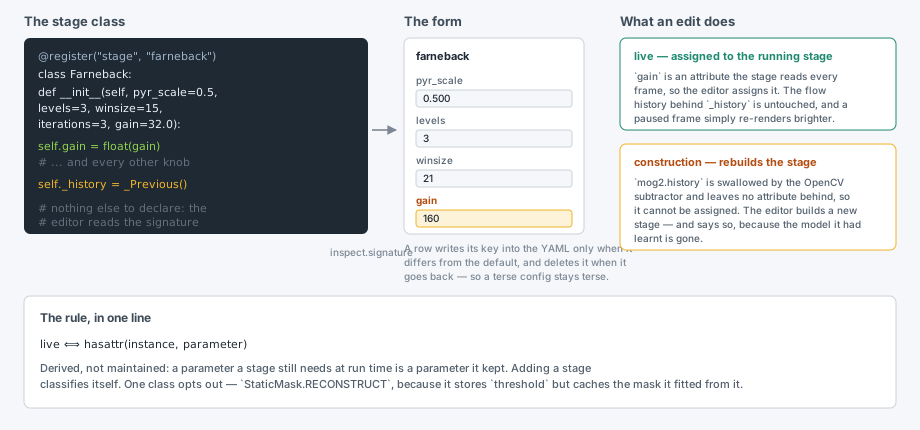
Each row writes its key into the YAML only when it differs from the constructor default, and deletes the key when it goes back — so a terse config stays terse instead of growing every default the first time it is clicked.
Some labels are amber. Those are construction parameters: values the stage
consumes when it is built and does not keep — mog2's history disappears into
an OpenCV subtractor, frame_diff's lag into a deque's maxlen. They cannot
be assigned to a running stage, so moving one rebuilds it, and a stage that had
learnt a background starts over. Everything else is assigned live, and a paused
frame simply re-renders as you drag.
Nothing in the codebase declares which is which. The editor asks the built
instance whether it still carries an attribute of that name, because a parameter
a stage needs at run time is a parameter it kept. The single exception is
StaticMask, which stores threshold but caches the mask it fitted from it, and
says so with one line: RECONSTRUCT = ("threshold", "invert").
Naming a stage
The last row of every stage's form is name (tap). Filling it in taps that
stage's output under that name, which is what makes it reachable — by a sink's
input:, by a select stage, and by the draw_on: of anything that paints.
Taps are opt-in; an unnamed stage costs nothing.
Gotcha, and the editor cannot save you from it: a tap holds
ctx.imageafter the stage ran.static_maskpublishes a mask intoctx.storebut leaves the frame alone, so naming it taps its input image. Reach the mask itself withinput: mask, which the dropdown offers.
Sinks
Sinks are edited with the same generated form — path, input, fps, dir,
whatever that sink's constructor takes. input: is a dropdown of every key that
currently resolves.
Sinks are shown, never run. The editor builds no sink object and opens no
file. What a sink's tab shows is its input: resolved against the current
frame, which is the whole of what a display or ffmpeg sink would do with it.
Nothing is encoded, nothing is written, and pointing a sink at
outputs/final.mp4 while you tune cannot truncate yesterday's render.
Previewing
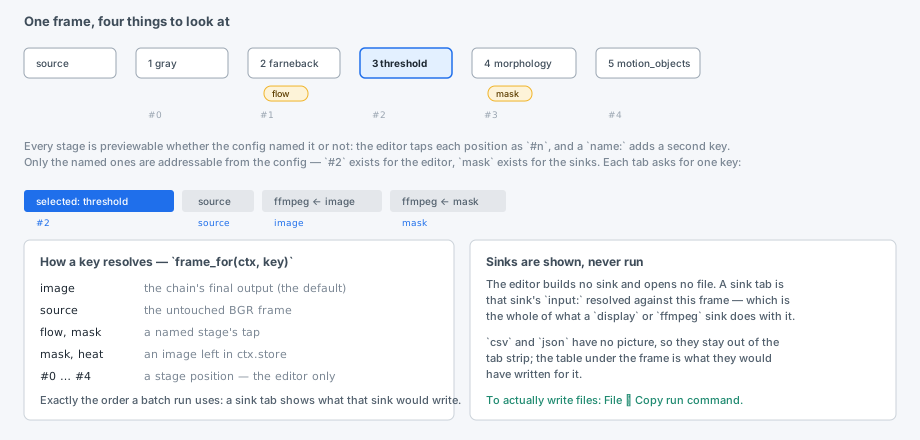
Every stage is previewable whether the config named it or not: the editor taps
each position as #n as well as by name. #2 exists for the editor; mask
exists for the sinks and the rest of the config.
A key resolves exactly as it does in a batch run — image, then source, then
a named tap, then any image left in ctx.store — because it is the same
frame_for() call. That is what makes the preview worth trusting: the tab is
not a rendering of what the sink would write, it is what the sink would write.
Only the visible tab is converted to a picture. Nothing off-screen is ever
turned into a QImage, which is why there is no thumbnail throttle to tune.
Moving through the video
◀◀ ◀ ▶ ▶▶ step ten frames back, one back, play/pause, one forward; the slider
seeks. Everything expensive — decoding, the chain, the conversion — happens on a
worker thread, so dragging never competes with a 200 ms HOG for the main loop.
Tuning while paused is the case worth understanding, because it is the one where a preview can quietly lie:
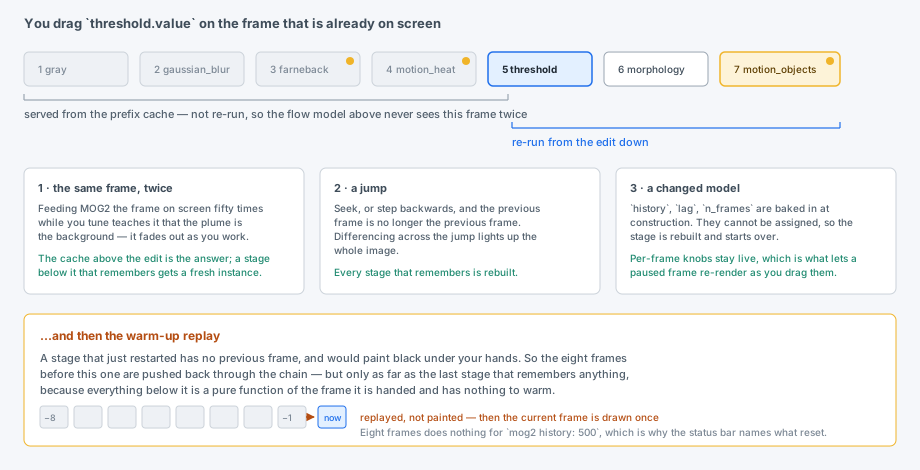
Three rules, all of them goncanalyser's, restated for a chain whose state lives on the stage instances:
- The same frame must not go through a stateful stage twice. Feeding MOG2 the frame on screen fifty times while you drag teaches it that the plume is the background, and it fades out as you work. The editor caches each stage's output for the current frame and re-runs only from the edit down, so a model above the knob you are turning is never re-fed.
- A jump resets. After a seek the previous frame is no longer the previous frame, and differencing across it would light up the whole image.
- A changed model resets. See the amber labels above.
After a reset, the eight frames before the current one are replayed through the
chain — but only as far as the last stage that remembers anything, since
everything below that is a pure function of the frame it is handed. Without the
replay, a rebuilt farneback would paint black under your hands.
The status bar names what reset, because eight frames warms a frame-differencer
and does nothing at all for mog2 history: 500, and a number you cannot trust is
worse than one that says so:
The millisecond figure is the whole cost of the edit, replay included.
Running the batch
The editor does not. File ▸ Copy run command puts
on the clipboard, and the run happens where runs belong — in a terminal, with a progress line, restartable, and with the ffmpeg encoder writing at full rate instead of competing with a window. The editor's job is the recipe; the CLI's job is the batch.
Keyboard
Ctrl+O / Ctrl+S / Ctrl+Shift+S |
open, save, save as |
Ctrl+N |
add a stage |
Ctrl+D |
remove the selected stage or sink |
Ctrl+↑ / Ctrl+↓ |
move the selected stage |
Ctrl+Q |
quit |
Why a list and not a canvas
A node canvas over this config format would draw a mostly straight line. Every
stage has exactly one input — Pipeline.run carries a single ctx.image down an
ordered list — so the graph is a tree: one producer, many consumers, which
flattens to a list plus taps. The gesture a node editor exists for, dragging a
second wire into a node, is precisely the one the format cannot express, and an
editor whose central gesture has to be refused is worse than no canvas at all.
If merges ever become expressible — stages taking an input: too, named buffers
instead of one ctx.image, a topological sort — a canvas stops being decoration.
Until then the list is the honest drawing of what the file is, and it is the
drawing that costs a third as much.
Troubleshooting
The window will not start: "could not load the Qt platform plugin xcb".
Importing cv2 points QT_QPA_PLATFORM_PLUGIN_PATH at the Qt5 plugins the
opencv-python wheel ships, and PyQt6 then refuses to load its own. The entry
point clears that variable before Qt starts; if you are launching the window
from your own script, do the same:
import os
import cv2  # noqa: F401  — must be imported before Qt
os.environ.pop("QT_QPA_PLATFORM_PLUGIN_PATH", None)
"no frames in …". The source path in the config is relative to where the editor was launched, exactly as it is for a batch run.
The window ignores my desktop theme. By design — it has its own two, and the
☀ in the menu bar's corner picks between them. What the desktop is set to
never enters into it. If you are constructing MainWindow yourself rather than
running segmentator-gui, call style.apply(app, theme) before building it, or
you get whatever the platform style hands you.
A stage raises while I am typing. Expected, and not fatal — the status bar
shows the exception and keeps the last good frame. farneback on a colour frame
is the usual one; it wants a gray above it.
Where the code is
| gui/spec.py | signatures, the live-vs-rebuild rule, YAML round-trip. No Qt. |
| gui/document_controller.py | the spec-list CRUD, labels, marks, default-sink lookups. No Qt. |
| gui/file_controller.py | open/save/save-as/the copy-run-command string. No Qt. |
| gui/edit_ops_controller.py | add/remove/shift/reorder index bookkeeping. No Qt. |
| gui/preview_tabs_controller.py | which preview tabs should exist, and which is current |
| gui/playback_controller.py | the preview worker's lifecycle: build/launch/stop, push, transport |
| gui/paint_controller.py | converted preview pixmaps and the last measurement snapshot |
| gui/optimize_controller.py | the optimize worker's lifecycle: build/release, re-check a selection, apply it |
| gui/style.py | both palettes, as a stylesheet and a QPalette |
| gui/worker.py | the preview thread: prefix cache, the three rules, warm-up replay |
| gui/optimize_worker.py | the optimizer thread: its own source, sampling, analyse off the main thread |
| gui/window.py | the window itself: widgets, and the Qt glue over the controllers above |
| gui/main.py | entry point, and the Qt plugin fix |
| tests/test_gui.py | runs headless: QT_QPA_PLATFORM=offscreen uv run pytest tests/test_gui.py |